Reports
The following reports can be requested from the EO control system:
-
Run Record – information relevant to the product processing in the Chambers. The data for this report is selected based on the load ID.
-
Process Record (Sterilization Only) – shows full phase information including time-stamped records for every phase that was executed during each stage, including deviations.
-
Process Summary – a subset of the detailed process run record. It presents only the step summary for every phase that was executed during each stage, including any deviations. This report is only available with the appropriate license.
-
If your site is configured for Calculated EO Concentration reporting:
-
The Calculated EO Concentration based on partial pressure (device 54) will be periodically reported in EO Inject phases and EO Dwell, and the final value will be shown in the phase summaries
-
The reporting of this device will be suppressed if the EO concentration alarm tolerance [Parameter 33] is not defined for the phase
-
To enable this configuration, please contact Konnexis as it is done via non-manageable System Configuration Parameter
-
-
Process Record with Chart – this option appends a chart to the last page of the Run Record report which spans the start and end time of the selected Load ID. This feature is only available for the “Process Record (Sterilization Only) report format.
-
-
Gas Usage Report – selected based on start and end date/time criteria.
-
Machine Events – all alarms, user actions, and events that occurred in the system. Selected based on start and end date/time criteria or by Load ID which automatically populates start/end date/time based on the start and end date/time of the selected Load ID.
-
Expired Calibrations report – lists all devices for which the calibration has expired
-
All equipment – shows expired calibrations for devices on all chambers
-
Specific Equipment – shows expired calibrations only for devices for the selected chamber
-
“Include Valid Device Calibrations” option – when selected, includes valid device calibrations on the report as well as expired ones
-
-
Specification – detailed information about the cycle definition. This report can be selected based on the cycle number and revision.
-
Customer Format – only lists checksum parameters (i.e. parameters used in the checksum calculation)
-
Long Format – lists all relevant parameters (checksum and operational)
-
Tabular Format (Steps Projected) – reported in tabular format with only most important parameter columns
-
-
Process Area – information relevant to product processing in the preconditioning and aeration areas (if applicable). Selected based on equipment (preconditioning or aeration) and start and end date/time criteria.
-
Process Area Loads – information relevant to product processing in the preconditioning and aeration areas (if applicable). Selected based on loads from the process area.
-
Equipment Phase Config. – report listing all Equipment/Phase Parameters and their configured values.
-
Certificate of Conformance Report – a report which includes the following information:
-
Run ID
-
Equipment (i.e. Chamber number)
-
Specification ID and Revision
-
Customer Name
-
Customer Load ID
-
Customer Spec ID
-
Date/Time Started
-
Aborted flag and Aborted By Full User Name
-
Date/Time Completed
-
Report Summary
-
Total number of steps processed
-
“All required steps were completed” indication if all steps were completed
-
“One or more phases were not executed” indication if all steps were not completed
-
-
Total number of deviations
-
Checkmark if no deviation occurred and all required steps were completed
-
-
Gas Usage by Drum Detail report:
-
Select "All Equipment” or Specific Equipment
-
Select a report data range
-
Report will list the gas usage for all drums used on the selected equipment in the date/time range
-
Total Equipment Usage and Total Gas Usage for these drums will be displayed
-
-
-
Gas Usage by Load Detail
-
Select “Include Load Detail” option
-
Select “All Equipment” or Specific Equipment
-
Select a report data range
-
Report will list same info as Gas Usage by Drum Detail report plus load detail:
-
Load detail will include:
-
Gas Usage by Load ID
-
-
Exporting Reports to PDF Format
AccuSOLO reports can be exported from the application into PDF format.
To export a report from AccuSOLO in PDF format:
-
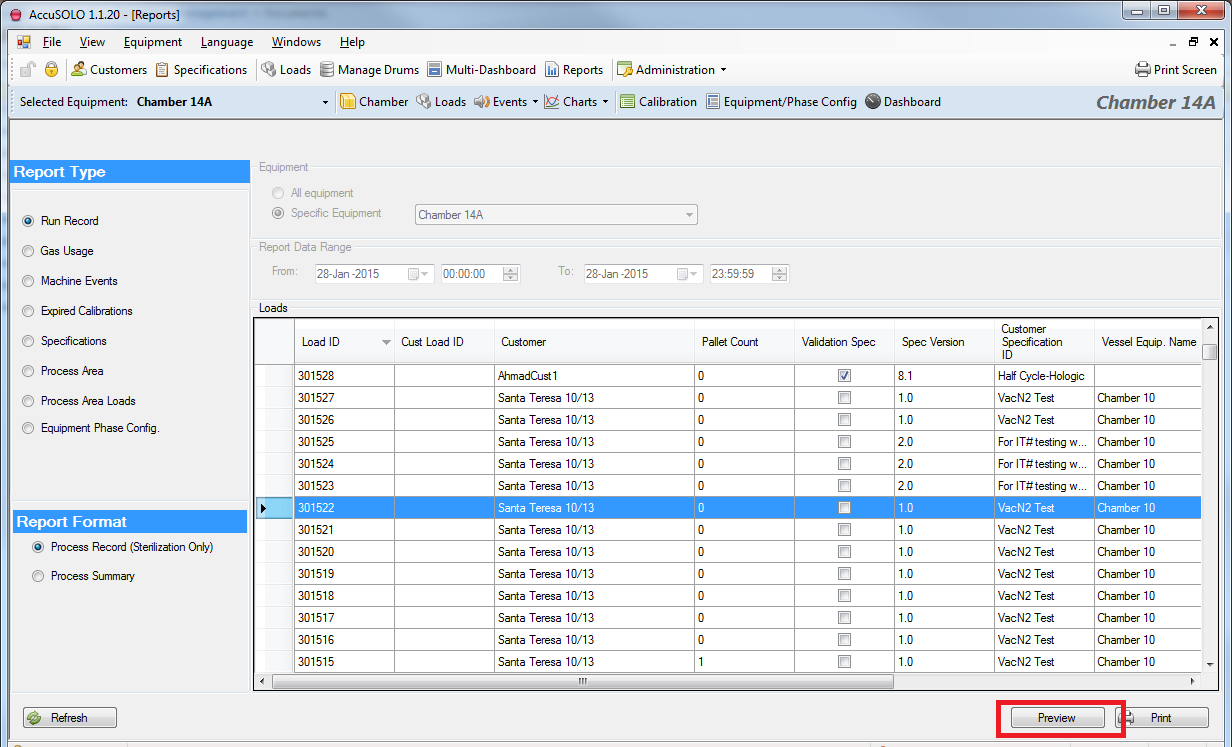
Navigate to the Reports module and select the report you wish to export and click preview.
-
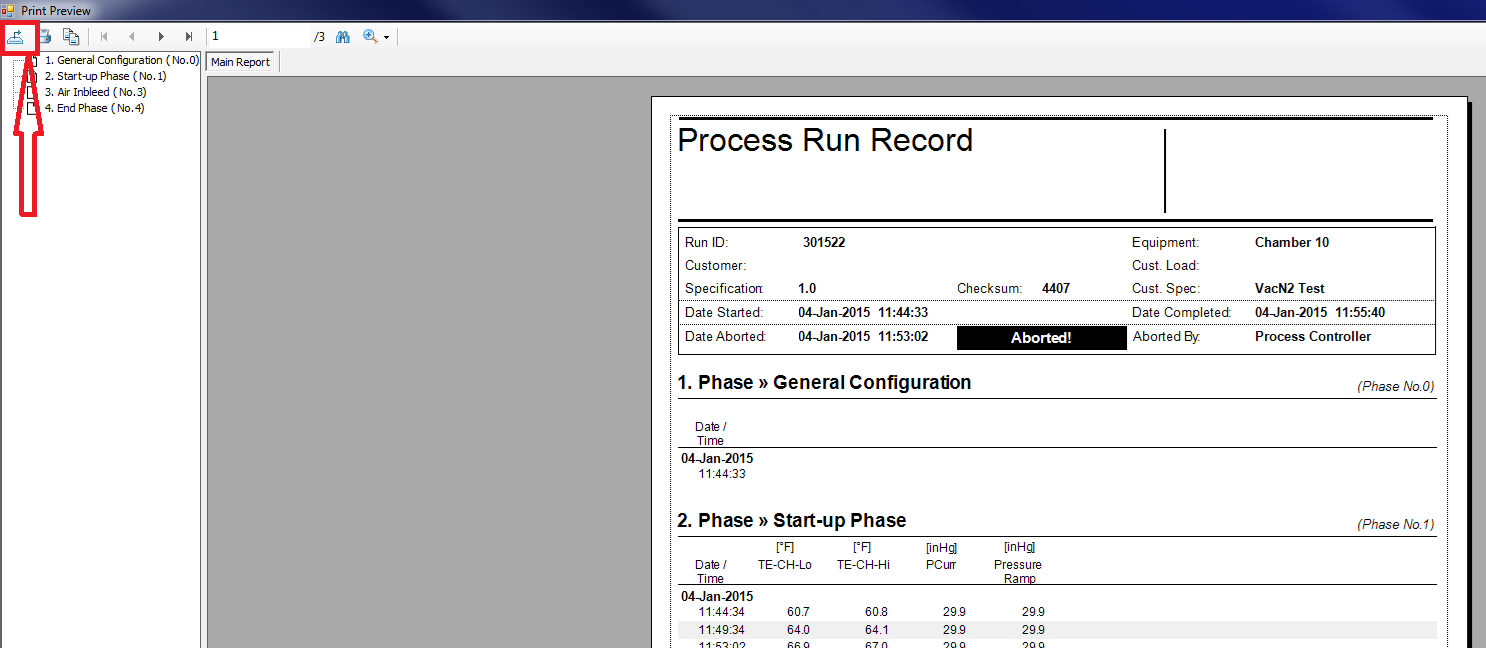
Once the report is presented in the preview window, click the Export Report button in the top-left corner.
-
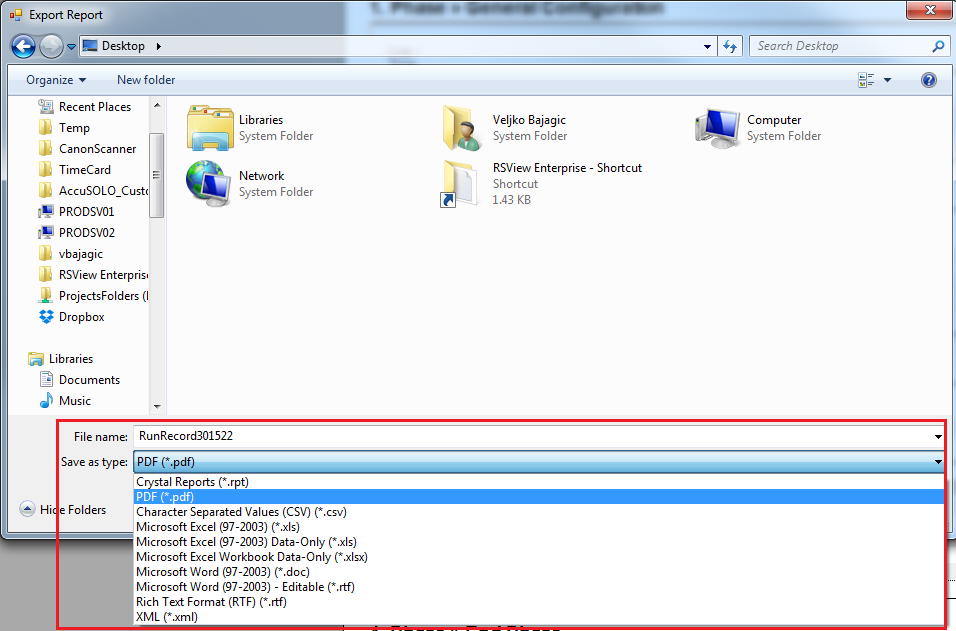
Type in a file name, select a local folder where you wish to save the file, and then select “PDF (*.pdf)” from the “Save as type:” drop-down menu.
-
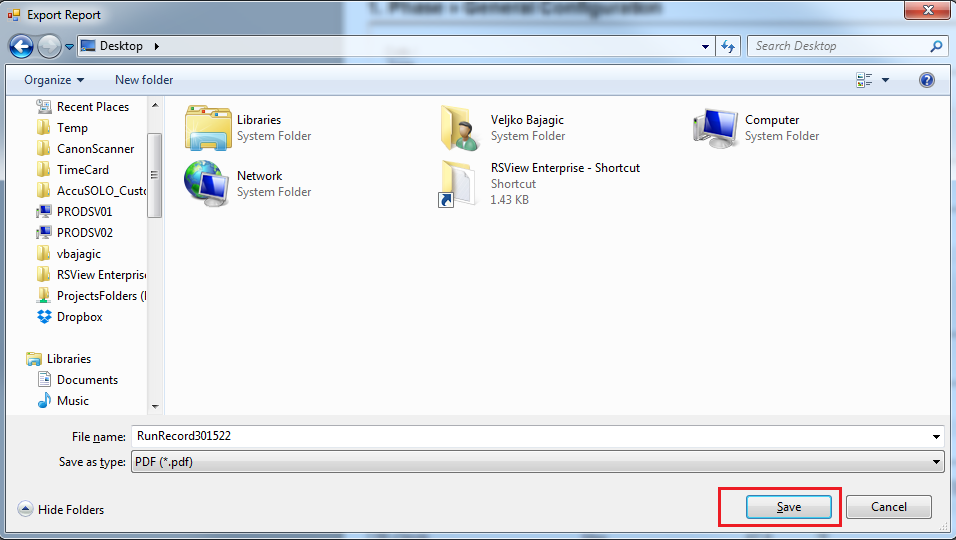
Click save and you will now have the exported report in PDF format.